
Traits

How to Reroll Traits in Roll a Barber RNG

Last updated:

Use the Trait Altar to replace an owned barber’s trait. Choose your target carefully: each reroll changes that barber’s bonus, so a useful result is worth keeping while you build resources for another attempt.

Go to the purple REROLL TRAITS stall beside the blue Shop, select your barber and press REROLL. Each attempt costs one reroll; hold the button to repeat. Stop on a result you want, or choose KEEP IT if a replacement confirmation appears. Haircuts have a 20% chance to drop one reroll. For a pity budget, compare your target rarity’s live remaining count with your available rerolls.

Budget reroll resources for the live remaining rarity countdown, before any early qualifying result or reset.

Required rerolls = remaining attempts × rerolls per attempt. Shortfall = max(required rerolls − available rerolls, 0).

  • Enter the current remaining countdown, not a presumed full pity threshold.
  • The countdown proceeds without an earlier qualifying result or reset.
  • New haircut drops during rerolling are excluded from the starting budget.
  • A rarity countdown does not guarantee a particular named trait.

Find the Altar and Select the Right Barber

Bring at least one trait reroll and own the barber you want to improve.

  1. Go to the purple REROLL TRAITS stall beside the blue Shop and open Trait Altar.
  2. Find your target under Choose a Barber. Use the name search to narrow the list; WORKING labels identify barbers currently serving customers.
  3. Select the barber and check the name on the left before spending a reroll.

A trait strengthens its holder. Switching your selection does not remove the previous barber’s trait; rerolling changes the barber you have selected. Prioritize someone you intend to keep working so the improvement contributes to your shop. If you are still choosing your workers, use the lineup guide.
Reroll Once, Hold to Repeat or Keep the Result

Each attempt spends one reroll and replaces the selected barber’s old trait with a random result.

  1. Press REROLL for one attempt, or hold it for automatic repeated attempts.
  2. Release the button when you want to stop. Check CURRENT TRAIT and let the barber’s list card finish updating; during repeated rolls, the card can briefly show an earlier trait.
  3. If a replacement confirmation appears, choose KEEP IT to preserve the current trait. Choose REROLL only if you accept losing it for a random replacement.

Replacement prompts can appear for valuable traits such as Epic Crown Cut and Legendary Fortune’s Favorite. The prompt is a decision about replacing your existing trait, not a choice between it and a known next result.

When resources are running low, keeping a useful bonus is a sensible stopping point. Compare trait effects and rarities to understand the result, or use the trait tier list to decide which bonuses suit your goal.

Get Rerolls from Haircuts

Each haircut has a 20% chance to drop one trait reroll. Keep your barbers serving customers to generate more drop opportunities; this is a chance per haircut, not a guaranteed reward every fifth haircut.

Collector provides ×2 Trait Reroll drops and +15% Money for its holder. It is a useful resource-focused option on a working barber. Treat the bonus as ×2 drops rather than converting it into a 40% drop chance.

Your shop can keep generating rerolls while you use the altar. Those drops can offset some spending or make the balance rise, so the difference between your starting and ending balances does not necessarily equal the number of attempts you made.

The 10 Trait Rerolls product was listed as not for sale. See the game passes and products guide for the broader paid options.

Read Pity and Update It After a Good Roll

The altar separates your spending balance from the Guaranteed rarity countdowns below REROLL:

Display What it tells you
“left” on REROLL Reroll resources available to spend
Epic+ Remaining attempts on the Epic-or-higher countdown
Mythic+ Remaining attempts on the Mythic-or-higher countdown
Secret Remaining attempts on the Secret countdown

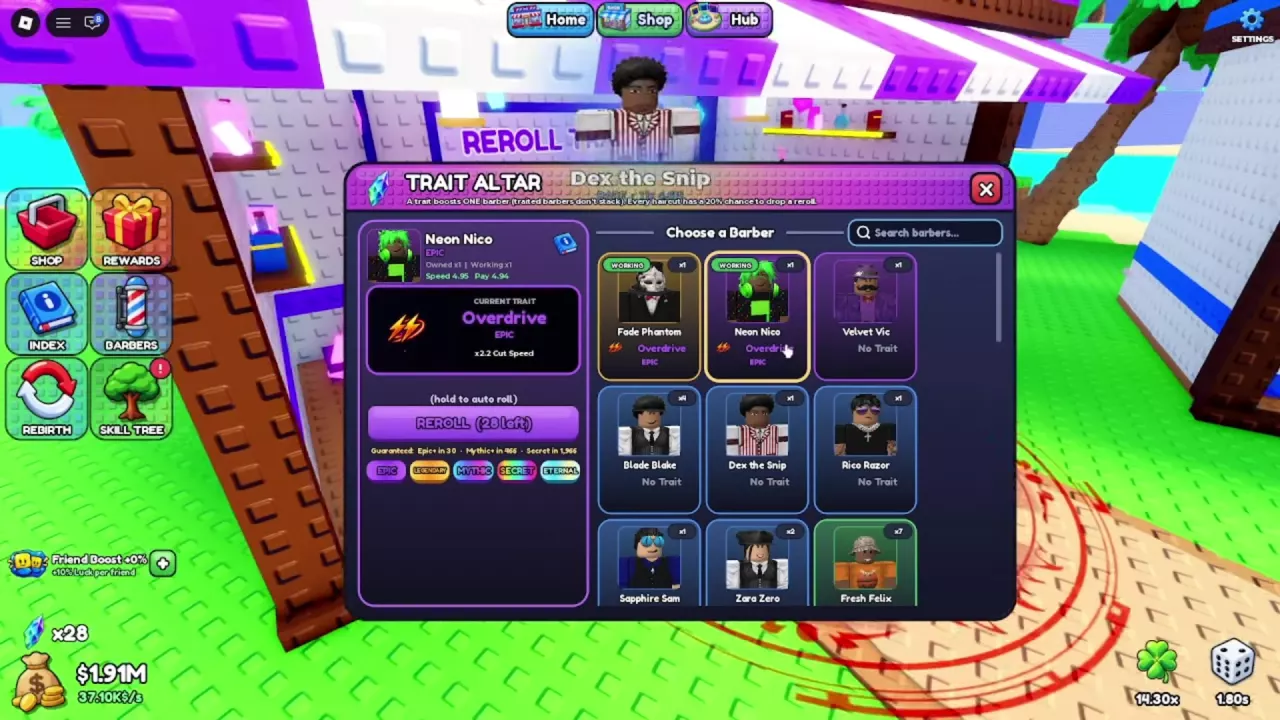
Read these counters again after a high-rarity result. An early Overdrive roll can reset the Epic countdown: in Neon Nico’s Overdrive example, it changes from 7 remaining to 30. You do not have to reach zero to receive a qualifying trait.

Use each live number as a remaining count. For example, 490 Mythic+ or 1,990 Secret means that many attempts remain in that state; neither number should be entered as a universal starting threshold.

These guarantees concern rarity. Reaching a rarity countdown does not guarantee a particular named trait such as Overdrive.

Neon Nico selected at the Trait Altar with Overdrive, the reroll balance and rarity countdowns visible.

Calculate Your Current Reroll Budget

Use the calculator to find how many resources you need to cover the countdown currently on your screen.

  1. Enter the remaining attempts for the rarity you are targeting.
  2. Enter your available rerolls from the balance beside REROLL.
  3. Read the required total and the additional rerolls needed. Update the inputs after a counter reset or a change in your balance.

With 30 attempts remaining and 10 rerolls available, the countdown requires 30 rerolls, leaving a 20-reroll shortfall. That budget assumes no earlier qualifying result or reset and excludes new haircut drops while you roll.

Use the shortfall to decide whether to keep farming before another session. A zero shortfall means your starting balance covers the current countdown; it does not make replacing a useful trait the better choice.

Neon Nico selected at the Trait Altar with Overdrive, the reroll balance and rarity countdowns visible.

Questions, answered

Can two working barbers both have Overdrive?

Yes. Fade Phantom and Neon Nico can each hold Overdrive while working. Each trait boosts its own holder. The altar’s notice that traited barbers do not stack should not be read as a ban on different barbers having the same trait.