Rolling

Roll a Barber RNG Auto Roll, Speed Upgrades and Calculator

Last updated:

Auto Roll lets you keep collecting barbers while your shop serves customers. Unlock it first, then shorten your roll interval with Fast Rolls upgrades and time the two-minute speed reward around your online session.

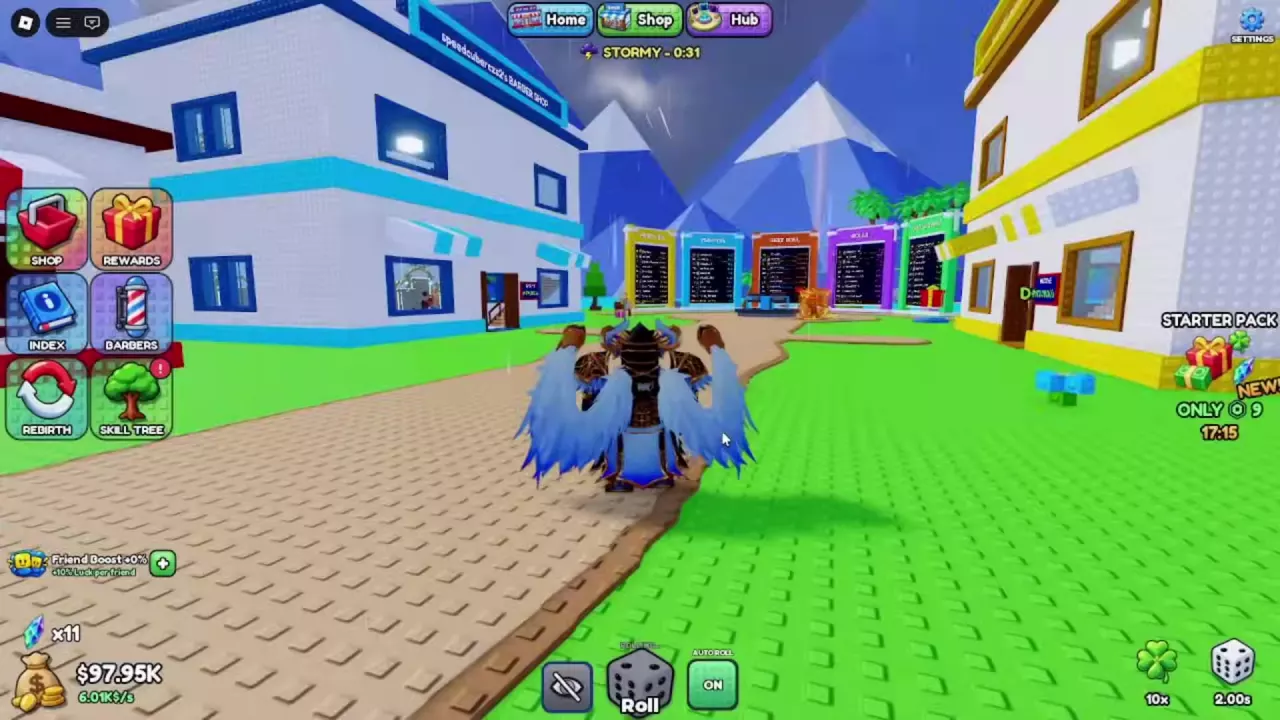
Complete 30 rolls, then turn on AUTO beside the Roll button and look for the green ON state. Fast Rolls I costs 140,000 cash; Fast Rolls II requires I and costs 4 million. After 15 minutes of playtime, claim a two-minute ×1.5 Roll Speed boost in REWARDS. Use your normal and boosted roll intervals in the calculator to estimate completed rolls during your session.

Estimate completed online rolls using separate steady and boosted roll intervals.

Boosted time = min(session time, remaining boost time). Estimated rolls = floor(boosted seconds / boosted interval) + floor(remaining seconds / normal interval).

  • Rolling continues throughout the session, with a constant interval in each phase.
  • Enter complete roll-cycle intervals, including any recurring animation or waiting time.
  • The boost starts at the beginning of the estimated session and expires once.
  • Partial cycles are discarded separately in each phase; boundary timing can change the actual count.
  • The result counts rolls, not barbers or successful rare results.

Roll Manually and Read the Final Reveal

  1. Press the dice-shaped Roll button at the bottom center of the screen.
  2. Wait for the animation to finish. Barbers passing through the rolling animation are previews; the final reveal identifies your reward.
  3. Read the barber’s name, rarity and displayed “1 in” label. If the result has a mutation, also check its mutation name and MONEY multiplier.

A SILVER reveal, for example, can display ×2 MONEY. That label describes an earnings effect, separate from the barber’s rarity. Special rarity animations can take over the screen, so let the reveal finish before identifying the result.

For ways to improve luck, see the luck guide and dice tiers and unlock order.

Unlock Auto Roll at 30 Rolls

  1. Keep using Roll until you have completed 30 rolls. The AUTO control to its right displays LOCKED and your progress while you are below the requirement.
  2. Once it unlocks, select the Auto Roll control.
  3. Confirm that it displays a green ON state.

With Auto Roll enabled, you can move around, enter your shop and open Skill Tree, Trait Altar or REWARDS while rolling continues. Reveals can appear over an open menu; closing Rewards does not require you to restart Auto Roll.

For an online idle session, leave Auto Roll on and have barbers working in your shop. They can keep serving customers and earning haircut income while new barbers roll automatically.

You can also leave Auto Roll running during Snow. See how to get Frozen barbers during Snow for the event’s mutation conditions.

Green Auto Roll ON control beside the bottom-center Roll button.

Buy Fast Rolls and Claim the Speed Boost

Buy the permanent upgrades

Open SKILL TREE and buy Fast Rolls I for 140,000 cash. It unlocks the path to Fast Rolls II, which costs 4,000,000 cash and requires I. Each node’s tooltip says rolls are 10% faster.

Prioritize Fast Rolls I when your goal is more rolls on a smaller budget. Fast Rolls II provides another speed improvement but requires a much larger cash investment. Use the Skill Tree guide to compare that purchase with other shop upgrades.

Claim the two-minute reward

  1. Reach 15 minutes of playtime.
  2. Turn Auto Roll on before claiming the reward so rolling is already underway.
  3. Open REWARDS and claim ×1.5 Roll Speed 2m. The eligible claim requires no currency or items.
  4. Look for CLAIMED and the active speed countdown. The two-minute boost starts immediately.

Match the interval to your active upgrades

The following progression illustrates how the displayed interval changes with the two upgrades and the temporary reward:

Upgrade and boost state Displayed interval
Before Fast Rolls I, without the speed reward 2.00 seconds
Fast Rolls I, without the speed reward 1.80 seconds
Fast Rolls I with ×1.5 Roll Speed active 1.20 seconds
Fast Rolls I and II with ×1.5 Roll Speed active 1.08 seconds
Fast Rolls I and II after the reward expires 1.62 seconds

The increase from 1.08 to 1.62 seconds happens when the temporary boost ends; the purchased upgrades remain. Use the interval that matches your current setup when estimating a session.

The five-minute ×2 Luck reward serves a different purpose: with Fast Rolls I, the interval remains 1.80 seconds while that luck reward is active. See playtime rewards for the other reward’s claim conditions and timing.

Estimate Rolls During Your Session

Use the calculator to estimate how many complete rolls fit into your planned online rolling time, including a temporary speed boost that is active at the start.

  • Session length: Enter the total number of minutes you plan to keep rolling. Use 60 for a rolls-per-hour estimate.
  • Normal roll interval: Enter seconds per complete roll without the temporary boost, with your permanent upgrades already included.
  • Remaining boost time: Enter the minutes left on the active speed reward. Use 0 for a session without a temporary speed boost.
  • Boosted roll interval: Enter seconds per complete roll while boosted, including the upgrades you already own.

Use the complete cycle from one roll to the next. If recurring animations or waiting time make that cycle longer than the displayed interval, time several complete cycles and divide the elapsed seconds by the number of rolls. Enter that average for the relevant phase.

Example: a 60-minute session

With a 1.80-second normal interval, two minutes of boost remaining and a 1.20-second boosted interval, the estimate is:

Phase or comparison Complete rolls
First 2 minutes at 1.20 seconds per roll 100
Remaining 58 minutes at 1.80 seconds per roll 1,933
Total with the temporary boost 2,033
Full 60 minutes at the normal interval 2,000
Extra rolls from the boost 33

This example assumes those inputs are complete roll-cycle intervals and rolling continues throughout both phases. Boost time is capped at the session length, and each phase discards its unfinished cycle. The estimate assumes a constant interval within each phase; an upgrade purchased halfway through would change that timing.

Double Roll Changes Rewards per Roll

Double Roll gives you two barbers with every roll. Its benefit concerns the number of barbers awarded per cycle, so do not halve your interval just because you own the pass. Enter your actual complete roll interval in the calculator.

The calculator counts rolls, not the number of barbers received or the chance of getting a rare result. It does not use the reveal’s “1 in” labels to predict a rare barber.

Choose Fast Rolls upgrades when you want shorter intervals; consider Double Roll when you want two barbers from each roll. See the game pass comparison for its price and other paid options.

Green Auto Roll ON control beside the bottom-center Roll button.