
Rewards

Roll a Barber RNG Playtime Rewards: Claim and Time Your Boosts

Last updated:

Claim free luck and roll-speed boosts from the REWARDS menu after reaching their online playtime requirements.

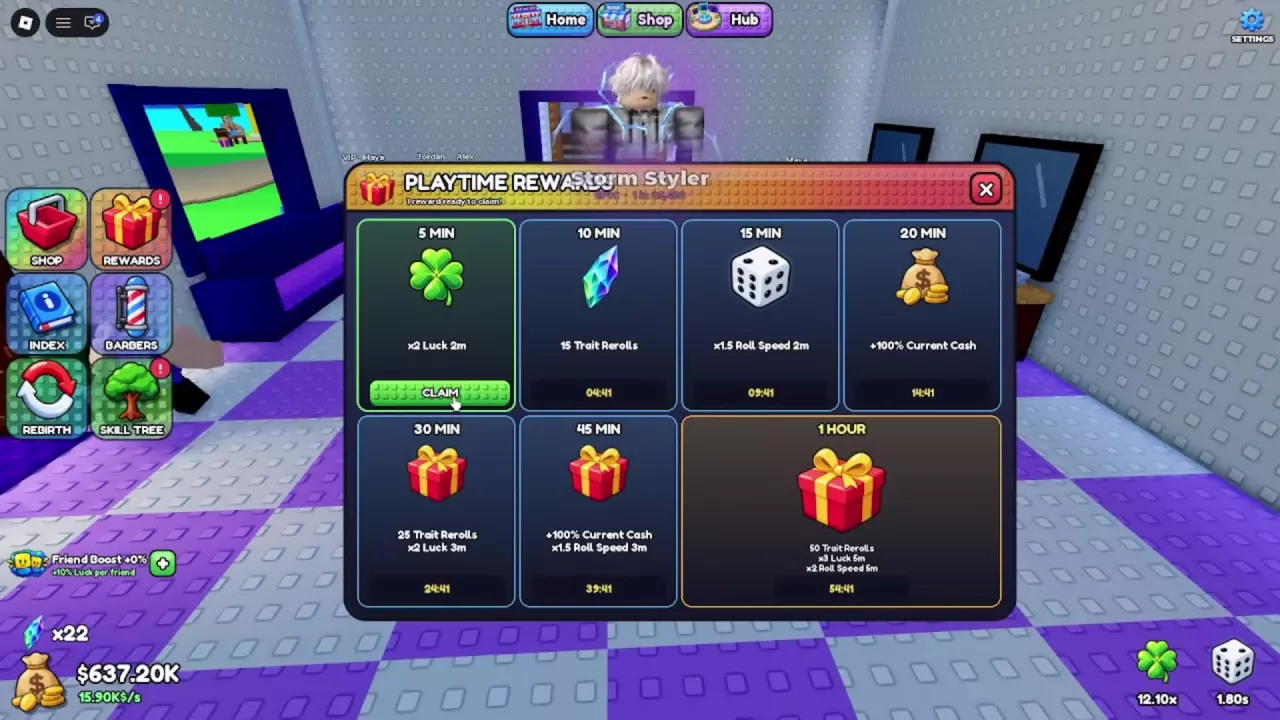
Open the gift-shaped REWARDS button on the left. Claim ×2 Luck for two minutes at 5 minutes of playtime, or ×1.5 Roll Speed for two minutes at 15 minutes. Each boost activates immediately when claimed, so keep rolling while its countdown runs.

The 5-Minute and 15-Minute Rewards

The 5 MIN tier grants a luck boost, while the 15 MIN tier grants faster rolling. Once you meet the corresponding playtime requirement, claiming either reward costs no cash or items.

Playtime Reward Boosts
NameRequired PlaytimeEffectEffect MultiplierDuration
x2 Luck
5 minutes (Online playtime requirement for the 5 MIN reward tier)
Luck
2 x (While the reward boost is active)
2 minutes (Begins immediately when claimed)
Roll Speed Boost
15 minutes (Playtime requirement for the 15 MIN reward tier)
Roll Speed
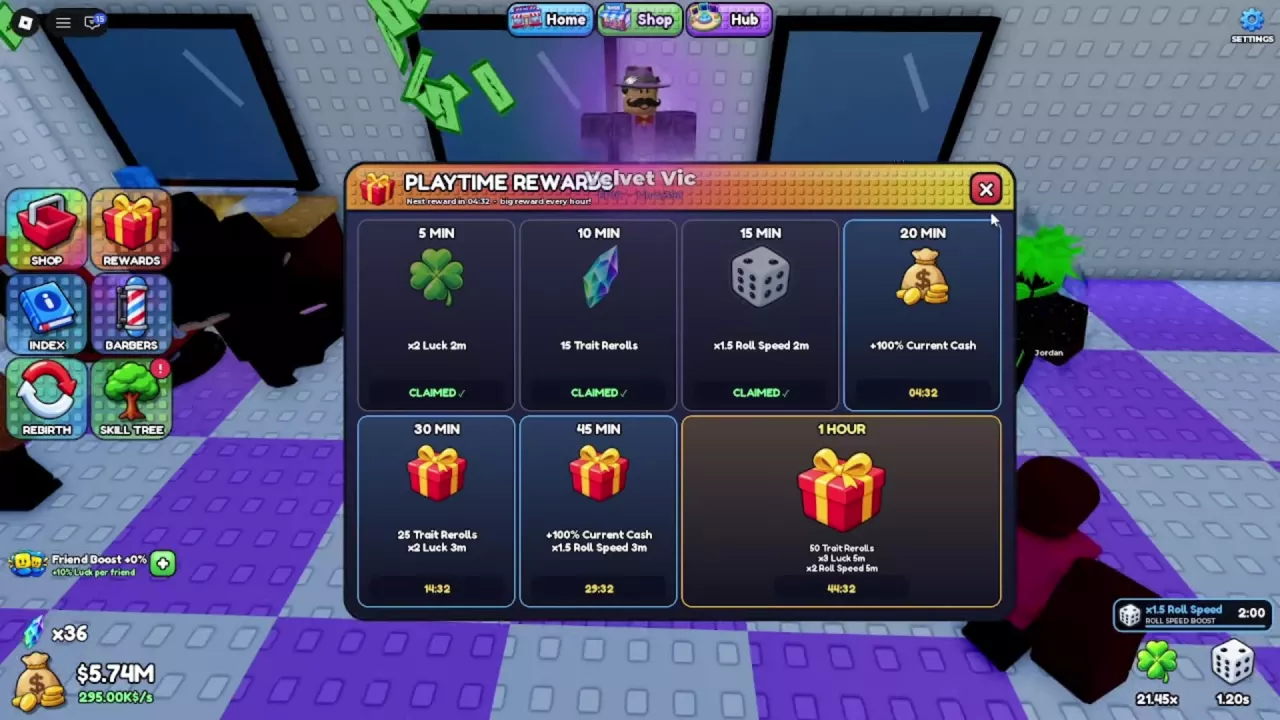
1.5 x (While the reward boost is active)
2 minutes (Begins immediately when claimed)
x2 Luck

Claim Payment Required
No (The demonstrated eligible claim required no currency or items)
Observed Total Luck
12.1 x (Demonstrated setup before claiming; example total, not a base value)
24.2 x (Same demonstrated setup after claiming; includes the reward boost)
Observed Roll Interval
1.8 seconds (Unchanged after claiming the luck reward in the demonstrated setup)

Roll Speed Boost

Claim Payment Required
No (The demonstrated eligible claim required no currency or items)
Observed Roll Interval
1.8 seconds (Demonstrated setup before claiming the speed reward)
1.2 seconds (Same setup immediately after claiming, before purchasing Fast Rolls II)
1.08 seconds (Demonstrated setup after purchasing Fast Rolls II while the temporary boost remained active)
Can operate alongside
Fast Rolls II (Demonstrated while the temporary reward was active; the interval changed from 1.20 to 1.08 seconds after the skill purchase)
  • x2 Luck

    Required Playtime
    5 minutes (Online playtime requirement for the 5 MIN reward tier)
    Effect
    Luck
    Effect Multiplier
    2 x (While the reward boost is active)
    Duration
    2 minutes (Begins immediately when claimed)
  • Roll Speed Boost

    Required Playtime
    15 minutes (Playtime requirement for the 15 MIN reward tier)
    Effect
    Roll Speed
    Effect Multiplier
    1.5 x (While the reward boost is active)
    Duration
    2 minutes (Begins immediately when claimed)
Playtime Rewards menu with the 5-minute luck reward ready to claim and the 15-minute roll-speed tier.

Claim and Confirm the Active Boost

  1. Open REWARDS using the gift icon on the left side of the screen.
  2. Find the eligible 5 MIN tile labeled x2 Luck 2m or 15 MIN tile labeled x1.5 Roll Speed 2m. Press its green CLAIM button.
  3. Confirm that the tile changes to CLAIMED. Look at the lower right for the active boost and its remaining time.
  4. Close the window with X and continue rolling.

If Auto Roll was already ON, it continues while the rewards window is open and after you close it. You do not need to restart it.

Claimed 15-minute reward with an active ×1.5 Roll Speed timer showing 2:00 at the lower right.

Claim When You Are Ready to Roll

Prepare to roll continuously before pressing CLAIM: the two-minute boost starts immediately. If you have Auto Roll unlocked, switch AUTO to ON first so you can use the active window without pausing between rolls.

  • Luck reward: Use it to increase luck while rolling. It does not shorten the roll interval. See other ways to increase luck for additional upgrades and bonuses.
  • Roll-speed reward: Use it to complete rolls faster. It can work alongside Fast Rolls II. For example, with Fast Rolls I owned and the temporary speed boost active, a setup had a 1.20-second roll interval; purchasing Fast Rolls II reduced that interval to 1.08 seconds.

For Auto Roll setup, speed upgrades, and estimates using your current interval, see the rolling guide.

Claimed 15-minute reward with an active ×1.5 Roll Speed timer showing 2:00 at the lower right.